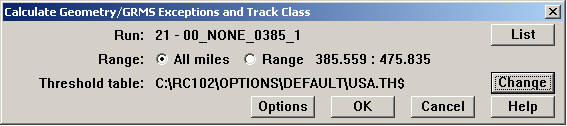
If the database contains foot-by-foot geometry/GRMS data, and you have created a Threshold Table defining exception levels, you may calculate 'safe' track class and GRMS exceptions. To calculate these values for an individual or partial run, use the menu item Run/Geometry/Calculate Track Class/GRMS Exceptions... (If this menu pick is not active, close any charts or other functions that use the threshold table.) For multiple runs, use Run/Calculate All... (The Calculate Track Class and Exceptions function is suppressed for UP data.)
Calculate Track Class and GRMS Exceptions Dialog
List and Range selections allow you to choose the run and select a mileage range. The Change button opens the Threshold Table dialog, allowing you to edit the threshold table or choose a different one.
The Options button opens this dialog:
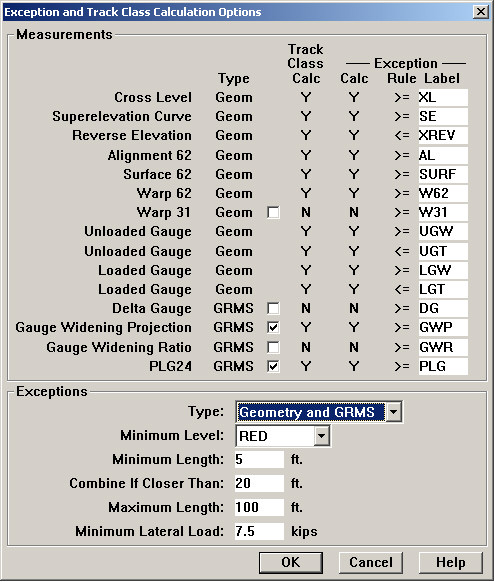
Calculate Exceptions and Track Class Options dialog
Calculating 'safe' track class and calculating exceptions are logically related. In Rangecam, they are combined into a single process to help ensure consistency in the results.
The user has partial control over which measurements are used in the calculation. The check boxes in the Calc column are used to include and exclude measurements. Where there is no check-box, no user choice is offered.
The Measurements group shows the measurements that will be used for calculating exceptions and safe track class. The list of measurements may be different from what is shown above. A measurement will appear in this dialog only if it exists in the currently open database.
Type indicates whether an exception is categorized as geometry or GRMS in charts and reports.
Checkboxes are used to include or exclude a given measurement from the calculation. The next two Y/N columns show whether or not a measurement will be used in the track class and exceptions calculations respectively. The user is allowed to decide whether Warp 31 and the GRMS measurements will be included. Since GWP (Gauge Widening Projection) and GWR (Gauge Widening Ratio) are different calculations meant to measure the same thing track strength your organization will probably decide on one or the other, not both. GWP and GWR are available if your database contains lateral and vertical load measurements, as well as loaded and unloaded gauge. If the database contains measured loads, you probably should de-select Delta Gauge, which is a less accurate indicator of track strength.
The Exception Rule column specifies whether the high or low threshold associated with the given measurement is used to generate the exception. The rule >= applied to unloaded gauge means that the high threshold is applied, which is the test for wide gauge. In the above example, wide unloaded gauge exceptions are labeled UGW. The rule <= applied to unloaded gauge means that the low threshold is used, which is the test for tight gauge. The corresponding exception label is UGT. As well as distinguishing wide from tight gauge, the exception rule also allows you to use different labels for over-elevation and reverse-elevation exceptions.
If you enter an exception type label that is not already in the database, it will be added. To review the exception types already recorded, use the menu item Database/Exceptions/Exception Types. Short labels are recommended here, as they are used in chart displays. If exceptions are closely spaced in track, longer labels are likely to overlap.
The lower group of options affects only the Exceptions calculation. The Type drop-down allows you to calculate both Geometry and GRMS exceptions, geometry exceptions alone, or GRMS exceptions alone. The reason for this choice is that some customers prefer to import geometry exceptions from the test vehicle, but to generate GRMS exceptions within Rangecam. In order to do that, select GRMS Only as Type. When you do so, the Exception Calc flags will turn to N for all geometry exceptions, indicating that they will not be calculated. Geometry measurements and thresholds will, however, still be used in the track class calculation.
Important: when exceptions are calculated for a given run and location range, any exceptions of the same type, from the same run and mileage range, are automatically deleted from the database! This allows you to re-calculate exceptions and track class using different threshold values or labels. In the previous example, if I calculate GRMS exceptions only, then any previous GRMS exceptions associated with that run will be deleted, but the geometry exceptions will not be.
Minimum Level is the least severe exception level used in the calculation. To avoid generating an unwieldy number of exceptions, you may wish to choose the highest exception level, normally indicating a condemned situation. (Lesser exception levels indicating warning conditions will still show up as color-coded values on strip charts .)
Minimum Length is the shortest length of an exception condition that will be recorded. This allows you to filter out short 'spikes'.
Combine If Closer Than says that if two exceptions of the same type are separated by less than the specified distance, they are recorded as a single exception.
If an exception condition exceeds the Maximum Length, it will be recorded as two or more exceptions. The reason for this option is that exceptions are displayed on charts as single points, located at the worst spot within range of the exception. If the length of a severe exception condition exceeds a chart page, it may not be displayed at all! Breaking up long exceptions using the Maximum Length setting is used to heighten their visibility to users.
Minimum Lateral Load affects the calculation of GWR and PLG exceptions. Vertical and lateral load values are used in calculating GWR and PLG. Sometimes a GRMS vehicle is unable to maintain the loads used for normal testing, for example, at crossings. This can result in spurious values for GWR and PLG, especially the latter. The Minimum Lateral Load setting prevents the process from calculating GWR and PLG exceptions in areas where lateral load drops below the specified value.