Individual profile shapes may be exported in either Ascii text or DXF format. DXF files may be read by AutoCad or other software packages. The Ascii text file format is documented in the Appendix.
To export an individual profile, choose Export Ascii or Export DXF from the Profile menu of the Profile View window. You will be prompted to enter a name for the export file.
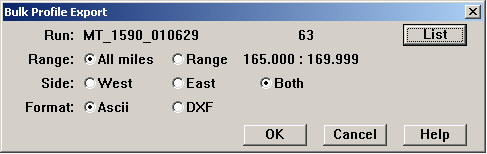
If you need to export many profiles, choose Export Bulk.... The following dialog appears:
Bulk Profile Export Dialog
After indicating a data collection run, you can choose to export all or some of the profiles it contains. Profiles can be selected by location range and track side. You have a choice of either Ascii text or DXF format.
When you select OK, another dialog allows you to select a folder in which the files will be created. You do not specify the file name. Rangecam creates a file name for each exported profile that identifies it uniquely. The file name is of the form:
subdivision_track_major-location_minor-location_side_run_sequence
where:
subdivision is the subdivision name
track is the track code
major-location is the whole unit of location (miles, kilometers, or chains)
minor-location is the decimal fractional component of the profile location
side is the compass side code (N, S, E, W)
run is the run number
sequence is the last two digits of the sequence number of the profile within the run.