It may be convenient to combine data collection runs that were collected around the same time on different portions of the same track, into a single run. This allows queries, charts, inventory and other reports to be generated in a single operation for as much as an entire subdivision.
Also, if geometry and profile data collected at the same time by the same vehicle has been imported to Rangecam, it is a good idea to join them into a single logical run. If a common odometer was used to record both data streams, the runs should be joined before location shifting, to maintain synchronization between them.
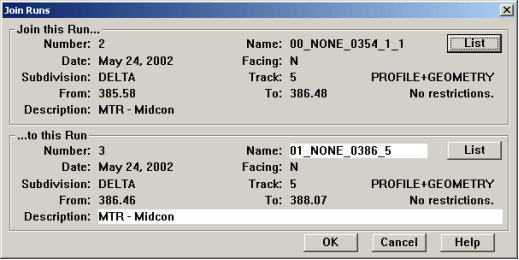
To join runs, select Join from the Run menu of the Profile View window. This dialog appears:
Join Runs Dialog
The dialog is divided into two groups. The upper group describes the run that will be joined to the run described in the lower group. The lower group describes the run to which the upper run will be joined.
The List button in each group is used to select a run. If a run has been selected in the Profile View window when this dialog is opened, the lower group defaults to that run. The user may change the selection.
To join the runs, click OK. A confirmation dialog appears, describing some of the attributes of the combined run. Click OK again to begin the process of joining runs, or Cancel to make changes.
After the join, the combined run is described by the information in the lower group. Input fields allow run name and description to be changed for the combined run.
Runs to be joined must meet the following conditions:
They must be from the same subdivision and track
Run dates must not differ by more than 30 days.
Caution: Joining of runs is irreversible! Although runs that have been joined may subsequently be split, the result may be different from the two original runs particularly if those runs overlapped!
It is recommended that two runs not be joined if there is a substantial mileage gap between them.
If two runs of the same type overlap, strip charts may show a misregistration between them in the overlap area. This is normally the result of odometer miscalibration and/or user error in milepost recording. If runs of the same type overlap, the registration between them should be corrected by location shifting (see section Location Shifting Run Alignment), or by splitting runs, before they are joined!
By contrast, runs of different types (geometry and profile) should overlap if they are to be joined.
The process of joining runs affects several database tables:
Profile data. If the direction the vehicle faced during the two data collection runs was different, the data from the run in which the vehicle faced the direction of descending mileage will be mirrored, and the combined run will appear to have been collected in the ascending miles orientation. Although the profiles are mirrored in storage, they will be displayed in the same orientation as before the join, appearing as though viewed facing the direction of ascending miles.
Run number updates. The run number of the upper run is updated to that of the lower run in all database tables. These include modeled profile, mile, track segment and track point records.
Rail inventory. Inventory records for both runs are deleted by the process of joining runs. Rail inventory should be recalculated for the combined run.
Rail wear averages. Track segment averages for both runs are deleted by the process of joining runs. Averages should be recalculated for the combined run.
Exceptions. Calculated exceptions associated with the runs are updated, so as to be associated with the combined run. There is no need to re-calculate or re-import exceptions.
Track segments. Calculated track segments associated with the runs are updated to be associated with the combined run. There is no need to re-calculate track segments for the combined run.