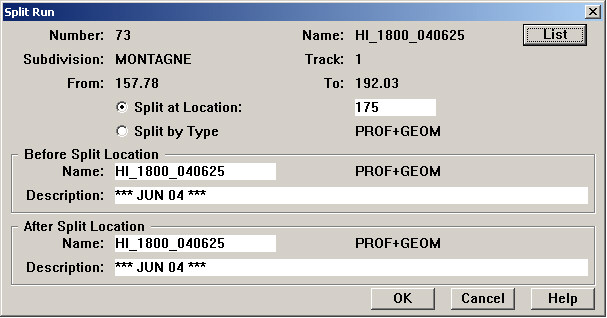
To split a data collection run into two runs, select Split from the Run menu of the Profile View window. The following dialog box appears:
Split Run Dialog
The run to be split may be selected by clicking the List button. If a run is selected in the Profile View window when the dialog opens, it becomes the default selection.
If a combined profile/geometry run is selected, you have the option of splitting it by type, into its two component runs, instead of by location.
To split the run geographically, you must enter a location at which the run is to be split. This defaults to the whole mile (or kilometer) that is closest to the halfway point of the run.
Name and description of both resulting runs must be entered. These default to the name and description of the selected run. You must change at least one run name. Run names are unique. Either or both names may be changed. (Run descriptions may also be changed, but there is no requirement that they be unique).
Click the OK button to start the process of splitting runs. There is no further confirmation dialogue; the splitting operation starts immediately.
After the split, the original run number is used for the 'before-split' run in the upper box. A new run number is generated for the run in lower box.
When the process is complete. a message appears giving the number of the newly created run. It will normally be one higher than the highest run number in the database before the split.
Like joining runs, splitting a run into two affects several database tables.
Run number updates. The run number of modeled profiles, track segments and track points is updated to the new run for all locations following the split. A track segment is considered to belong to the new run if its midpoint follows the split location.
Rail inventory. Inventory records for the run to be split are deleted. Rail inventory should be recalculated for both post-split runs.
Rail wear averages. Track segment averages for the split run are deleted. Average wear should be recalculated for both post-split runs.