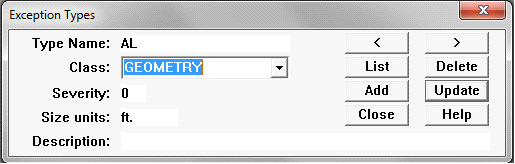
The Exception Types Dialog is used to define types of exceptions. Exception types must be set up before individual exceptions and defects are manually entered. However, the processes used to import or calculate exceptions in Rangecam also record exception types. If exceptions are not recorded manually, this dialog may not be needed.
Each exception type has a unique name. It is recommended that exception type names be kept as short as possible, as they are displayed on exception charts. If exceptions are closely spaced the type names may overlap, making them difficult to read.
Class indicates whether the exception type is Geometry, GRMS, Rail, or VTI (Vehicle/Track Interaction events). You may create an additional class by typing a new class name in this field. It will be added to the drop-down list for future use. Note that only Geometry and Rail exceptions can be displayed in charts.
Severity is the default severity level for exceptions of this type. When a type is selected in the Exception Maintenance, the exception severity will be set to this value.
The value entered for Size units also appears in the Exception Maintenance Dialog when an exception type is selected, as a reminder to help achieve consistent data entry.
Description is used to fully specify the meaning of the exception type name. By double-clicking on a charted exception, the type description and other attributes are displayed.