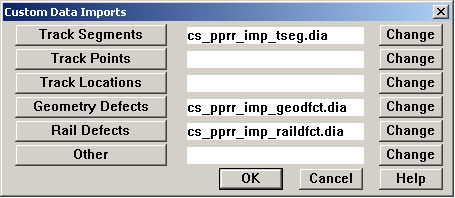
The Import... pick on the Database menu opens a dialog allowing you to run custom data import routines. These are software application files written in Rangecam's Dialog programming language (extension .DIA). They are used to import various types of data from Ascii files or other data sources owned by railroads.
The buttons in the left column are used to run the custom routines, Track Segments to import track segments, etc. The file names of the routines themselves are listed in the center column. Click on the buttons labeled Change to browse for files. Import files may be located anywhere on your computer.
If you wish to import a type of data that is not listed in the left column, click the Change button on the last line, opposite Other. After selecting a Dialog file containing the import routine, you will be prompted to enter a new button label. The next time you open the Custom Data Imports Dialog, the button you defined will be displayed, followed by a new row with an Other button.
For information on development of custom data imports, please contact Holland LP.