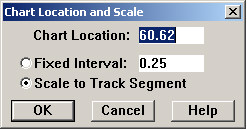
The Location and Scale menu item behaves slightly differently for the Segment Condition Chart than for the Track Condition Chart. It opens this dialog:
Segment Condition Chart Location and Scale dialog
Besides allowing you to enter a chart location and interval, this dialog lets you switch between a fixed interval (like the Track Condition Chart), and a variable-length interval scaled to the length of a track segment the default scaling mode for the Segment Condition Chart. If you wish to change to a fixed interval, click on the Fixed Interval button and change the interval to the distance you wish to see displayed on one screen. You will probably also want to change the Chart Location value to start at a whole-mile boundary.
To change back to track segment scaling, enter a chart location that is included in the segment you want to display. The chart will be centered on the selected segment.