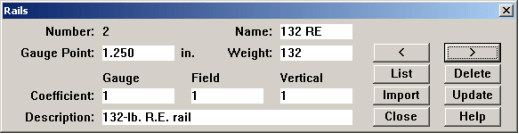
The Rail table describes unworn rail profiles. Each has a user-defined name and description. The name must be unique. The weight of the rail is primarily for user reference; at present, it is not used in any calculations.
The Gauge Point field describes the distance below the top of the unworn rail at which gauge-side and field-side wear are measured for the "fixed-point" method. If this field is left blank, the Gauge Point Reference Distance modeling option is used. For an explanation of the difference between "fixed-point" and "floating-point" methods of measuring side wear, refer to Modeling Options.
The three coefficients "Gauge, Field, and Vertical" are weighting factors used in the calculation of combined wear, according to the following formula:
cw = (gw x gc) + (fw x fc) + (vw x vc)
where cw is combined wear, gw is gauge face wear, fw is field face wear, vw is vertical wear, and gc, fc, vc are the coefficients for gauge wear, field wear and vertical wear respectively. If all three coefficients are set to 1.0 (the default), then combined wear is a simple sum of positive values of vertical wear and the two horizontal wear measurements. Negative values are not used in the calculation of combined wear.
For Union Pacific Railroad combined wear is predefined as "Side wear"
cw = gw + fw
The rail table dialog has an Import button in place of Add. Import allows you to specify a file containing the definition of an unworn rail profile. The rail import files are installed with the Rangecam Office System. They may be found in the RAILS folder within the installation folder.