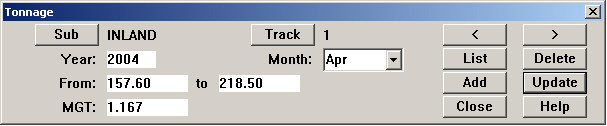
The tonnage table is used to record the tonnage of traffic that travels over the track. Tonnage is recorded on a monthly basis. A record consists of a subdivision, track code, starting and ending locations (in scaled distance units), month and year, and the tonnage seen by that section of track in the month. Tonnage is normally recorded in MGT (millions of gross tons). Metric users may interpret MGT as millions of tonnes. The units of tonnage are not important as long as usage is consistent.
The Tonnage Maintenance Dialog is reached from the Profile View window Database menu.
Click List to view previously-recorded tonnage records and retrieve them for editing. Click Add to record new tonnage records.
Often, you will want to enter tonnage records for sections of track with the same starting and ending locations, month after month after month. The Add dialog for tonnage records has two extra buttons to help make this data entry easier.
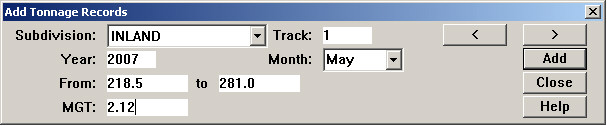
If tonnage records have been recorded for an earlier time period, the > and < buttons allow you to select the next or previous mileage range from the earlier records. To add the first records, fill out the form and click Add. The MGT field will reset to 0, indicating that the record has been added successfully. To add a record for the next section of track, click the > button. In the example shown, the From field would change to 405.08, and the To field would change to the next higher location entered for this subdivision and track in an earlier time period. To create the record, you need only enter the MGT value and click Add.