The "coarse" geometry alignment function is provided to approximately correct gross misalignments (e.g. 0.10 mile or more) which "fine" geometry alignment cannot handle. If needed, coarse geometry alignment should be used before fine alignment.
Choose Align on Geometry (Coarse) from the Track Condition Chart Shift menu. This function is used exactly the same way as the fine geometry alignment function. The main differences you will notice are:
Anchor bars are only created at mileposts, not between posts.
Very few of the anchor bars are shifted automatically.
The resulting alignment will be "coarse", or approximate.
Although it also uses the geometry database table, the coarse geometry alignment works on a different principle than fine alignment. Whereas fine alignment is based on analysis of the data signature of geometry channel, coarse alignment only uses record counts between mileposts.
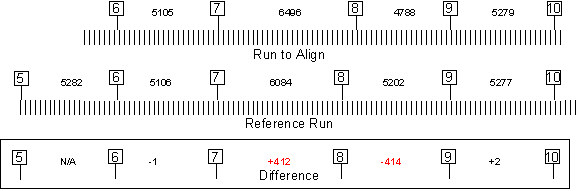
Coarse geometry alignment exploits the regularity of sampling in track geometry testing. All track geometry systems sample at a fixed interval usually one or two feet, or 0.25 m. The coarse alignment technique relies on this regularity to look for aberrations that indicate milepost errors, as illustrated by the following example:
"Coarse" geometry alignment example
In most cases, there is little difference in the distance between corresponding mileposts in the run to be aligned and the reference run. Although some "miles" may be "long" and others "short", their proportions will be preserved between runs if mileposts are stamped carefully. If, however, there is a significant error stamping a particular milepost in one of the runs, the difference in distance between it and neighboring mileposts will stand out as a statistical aberration. In this example, such an aberration can be seen on either side of milepost 8, where there is over 400 feet difference in the distance recorded by the two run.
If the coarse alignment process detected this aberration, it would move milepost 8 approximately 413 feet to the left, towards milepost 7, resulting in a reasonable alignment with the reference run. The other mileposts, which are not aberrant, would not be moved at all.
The following points should be kept in mind when you use the coarse alignment feature:
Most important: Coarse alignment may not work as expected with geometry runs that have been joined to other geometry runs. There may be discontinuities where the runs are joined that prevent the process from working.
The process does not assume that the actual distance between mileposts is uniform, or even close. It allows "long" and "short" miles (and other units of distance).
Also, it does not assume that the geometry sampling rate is the same between the runs to be aligned. It does, however, assume a constant sampling rate within each individual run.
The runs being aligned must be long enough, and include enough mileposts, to support statistical analysis for outliers. The above example, with only five mileposts in common between the two runs, is probably too short to work properly. The ratio between "correct" (i.e. close) and aberrant mile-stamps must be at least 5 or 10 to 1 in order for the aberrant ones to be detected.
Only the most extreme errors in a run will be detected and corrected. If a run contains some mileposts that are out by 0.1 mile, and others that are out by 0.5 miles, only the worst ones will be found the first time the alignment is run. After those are corrected, the 0.1 mile errors may be found by running coarse alignment a second time.