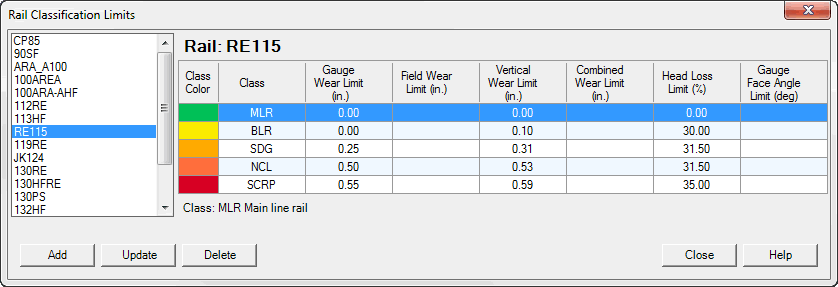
There are two dialogs that allow to view/maintain the Rail Classification table.
When an user selects menu Database->Rail Classification the first dialog Rail Classification Limits appears.
Selecting rail in a left panel the user sees a list of available classification limits in a right panel.
User can navigate in a classification grid, selecting different classification. Class color column shows a color associated with different classifications. This color is used in a strip chart (if the corresponding option is selected) to visualize rail wear classification limits. Other columns show values of limits, which depends on selected units. Below the classification grid one can find a description of the selected classification.
In Track Analyst this dialog works as a viewer only (buttons Add, Update and Delete are disabled).