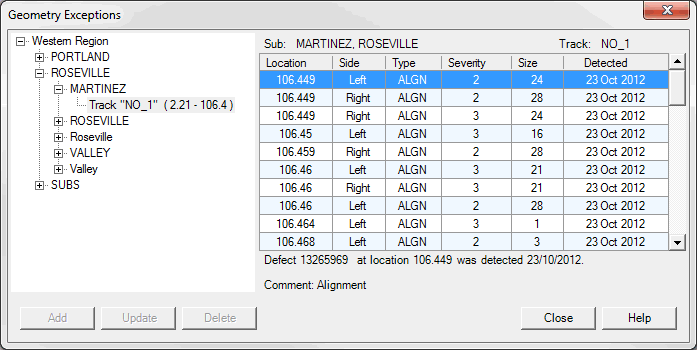
Similar but separate dialogs are used to show geometry, rail, GRMS and other types of exceptions or defects. This example uses the Geometry Defects dialog as an example of all four, noting the minor differences between them.
Defect Viewer
The Geometry Exceptions Dialog shows all defects in the data grid for the entire selected track. The track can be selected from the control on the left side of the dialog. Selecting a new track immediately replaces the defect list with a new one. A description of the track is shown above the data grid. The given example shows that we selected track NO_1 belonging to two subdivisions, Martinez and Roseville.
The defect list is sorted by track location.
Any defect within the grid can be selected by clicking the mouse on any row, or by using the up/down key on the keyboard to navigate through the list. Detailed information about the selected defect is displayed below the grid.
A defect has a point location, specified by subdivision, track and mileage. Track side is also normally specified for rail defects, although not for geometry defects. The field is empty if the track side is unknown. If the side is empty for a rail defect, the defect will be displayed in charts for both sides of the track.
If both an application and database allow, a selected defect can be created, deleted or updated by clicking the corresponding buttons in the dialog on the left side. Some databases (like UP) do not allow the user to modify the original data. In this case these buttons are disabled as shown in figure above.
Use the Add button to open a new dialog to create new defect.
The Update button opens a similar dialog (shown below) to modify defect information.
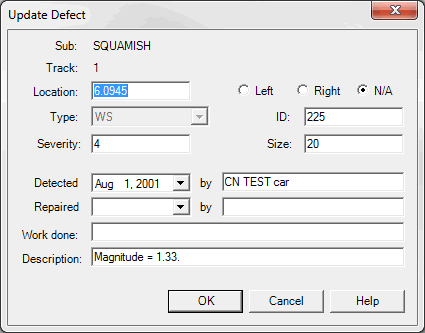
Add/Update Defect Dialog
The Type drop down list is used to select defect type. It is used only when user creates defect but not updates.
Severity is a numeric indicator of the seriousness of the defect. Severity values are used to calculate Defect Index Charts (see Exception Charts). If you wish, you can record a severity number with the defect type; if you do, it is used as the default severity for individual defects when the type is selected or changed. The severity recorded for the individual defect overrides the defect type severity in reports.
Defect Size is a note field not used in calculations. The unit of size is specified when you set up the defect type.
ID is another note field, which may be used to enter an independent defect tracking number or code used by the railroad.
Detected is the date the defect was detected. This is a required field. Detected by normally identifies the test vehicle that detected the defect, or the person who found it by visual inspection. Repaired is the date the defect was repaired. Until the defect is repaired, it should be left blank.
The comment line (Description) provides space for additional notes.
Delete button delete selected row from database and update list.