1. Configure the custom imports for cs_run_reimp.dia
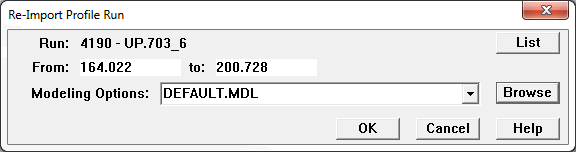
2. Click the custom import button in the "Custom Data Imports" dialog. The "Re-Import Profile Run" dialog will pop up. If no run is selected, the select run dialog will be popped up before the dialog for selecting target run.
3. In the "Re-Import Profile Run" dialog, we can change the target run, set the range for re-import, select the modeling options.
4. Click the OK button in the dialog, the "Open Enterprise Database" dialog will be popped up, we need to input the password for the staging database.
5. Rail Types dialog will pop up to allow choosing rail type candidates.
6. Re-import will be started.