Geometry measurements based on change over distance can be calculated and stored in the database. You can calculate Warp 31 and Warp 62, which are based on difference in crosslevel.
The Calculate Geometry Difference dialog is opened by selecting Run/Geometry/Calculate Geometry Difference... from the Profile View menu. (If this menu pick is not active, close any charts or other functions that use the threshold table.) To perform the same operation on more than one run, use Run/Calculate All...
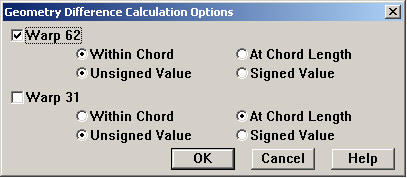
In the Calculate Geometry Difference dialog you specify a run and location range to be calculated. The Options button opens a second dialog allowing you to specify measurements to be calculated:
Geometry Difference Calculation Options dialog
You may choose to calculate Warp 62 (warp based on a 62-foot chord), Warp 31 (on a 31-foot chord), or both. Different processing options may be applied to each one.
Warp is change in cross-level within a fixed distance along the track. The "Within Chord" option calculates the maximum difference in cross-level within the distance. "At Chord Length" calculates the difference in cross-level at a constant distance. If "At Chord Length" is selected, you may choose to calculate warp as a signed or unsigned value. If maximum warp within a distance is chosen, the calculated value is always unsigned.
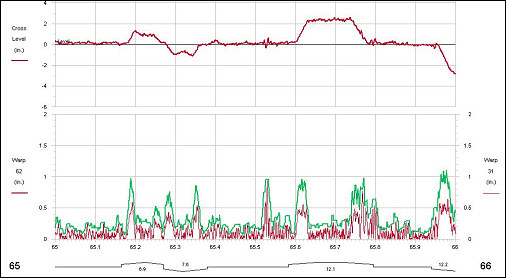
Warp at 31' (lower line) overlaid on warp within 62' (higher line)
In Track Analyst, the geometry difference calculation is only available for stand-alone databases. Batch calculations for Enterprise databases should be done by the Rangecam Office System.