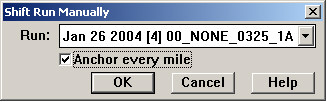
For manual run alignment, choose Shift/Shift Manually from the Track Condition Chart menu to put the chart into location correction mode. This dialog appears:
This dialog offers the option of "anchoring" every mile. If the box is checked, an anchor bar will be displayed by default at whole mile (or kilometer) boundaries on the chart. If not, no anchor bars will appear automatically. In either case, you can begin using the Visual Alignment Interface.