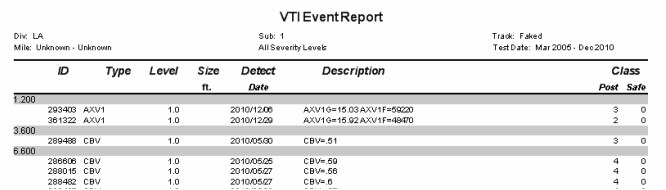
Three similar reports are available for geometry and GRMS exceptions, rail defects, and VTI events. To run them, choose Reports/Exception/Defect Reports from the menu. Reports can be generated in Crystal or CSV formats.
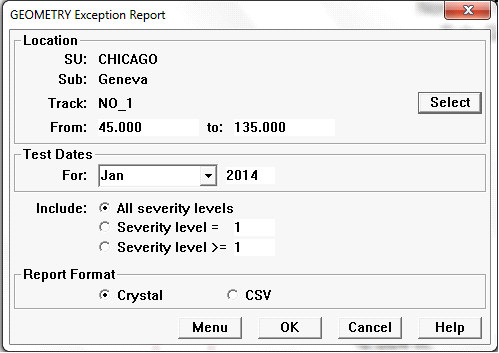
Geometry Exception Report Dialog
Select a run. The location will default to the currently selected run. You may click the Select button to select a different track within the territory; you can also restrict the mileage range in the From - To fields. You can select another run within the territory by clicking the List button. You must also select a month and year containing the test date of interest. (In the case of Rail Defects, where defects over time are of interest, you may select a date range.) If you have recorded exceptions of more than one severity level, you may select the severity levels to be included. A number is used to identify the severity of the exception. The severity levels are associated with exceptions. They are logically independent of the levels defined in the threshold table, and may or may not correspond! However, if you are reporting on GRMS exceptions calculated by Rangecam, the severity levels will correspond to those defined in the threshold table used for the calculation. If GRMS exceptions were calculated for Red, Orange, and Yellow levels, where Red is most severe, the Red exceptions will have been assigned the severity level 3.
Use the Menu button to save report options as a reusable template to the map Reports menu. Click OK to run the report.
The report can be written to Crystal or CSV formats. Here is an example of the geometry exception report as a Crystal report:
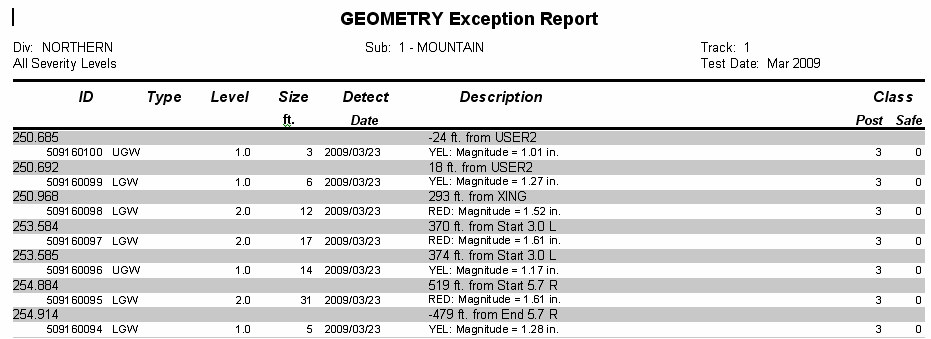
The report contains the exception ID (if any), its location, type, severity, length, detection date, and description. Location is also specified relative to the closest track point or curve boundary. A negative foot count means that the defect occurs before the track point with reference to the direction of increasing mileage. Posted and 'safe' track class at the defect location are also included.
The VTI Event report includes the event location, i.d., type and level, along with a description of the event.