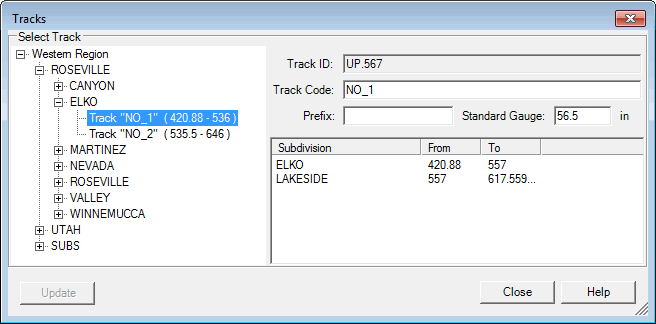
The Track dialog shows track information.
Track Dialog shows information about track
The user can select track from the left Select Track Control by opening territory selections. If a track crosses a subdivision it will appear in the list. If a track crosses several subdivisions the description in right panel will provide information about that. In the example above, the track crosses two subdivisions: ELKO and LAKESIDE.
Track ID is railroad-wide unique identifier of track managed by Rangecam. This ID is used for data exchange between Rangecam and a railroad. Data, like defects and runs, are associated with track ID.
Track Code is a user-friendly description of track such as SIMN, SM (Single Main) or 1.
You must record the standard (nominal) gauge for the subdivision (56.5" by default). This value is used by the visual gauge indicator in the Profile View windows, and by other Rangecam functions related to gauge. Standard gauge must be set correctly using Rangecam Office, as this information is stored in the database and cannot be changed in Track Analyst or Track View.
Some tracks have mileposts with prefixes like A27. In this case, the track must have a prefix that is shown in field Prefix.