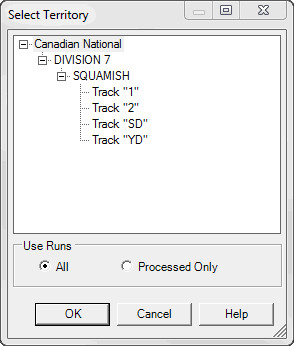
Some runs need to be processed after import. Such processing includes a modification of rail types, an alignment, a removal of incorrect data and so on.
New imported runs may be or might not be marked as "processed". A data processing operator has an opportunity to mark run as processed or unprocessed. Also some import routines mark new imported runs as unprocessed.
A database administrator can configure a database to turn on/off the feature "Use Processed Runs Only". If this feature is off a user has an opportunity to select to work with all runs or only with processed when opening a database. Unprocessed runs can be excluded from consideration. They won't appear in list of runs. Queries will ignore these runs. The only exception is the Run Explorer (see below) that shows all runs in database but in different colors.
"Use Processed Runs Only" feature is off. The application will work with all runs in this case.
When a user processed a run he can change status of run as "processed".
Open Run Explorer from menu Database->Run... .
In Run Explorer unprocessed runs are highlighted by red color.
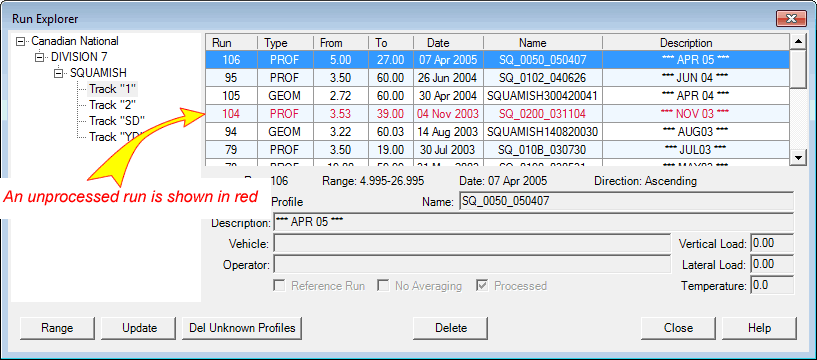
Read color indicates unprocessed runs in the list
When unprocessed run is selected checkbox Processed in unchecked.

A check box indicates if run is processed or not
To modify a status of the run select it using a mouse or a keyboard and click Update button.
In the opened dialog Run Update Form check in the box Processed and click OK. Record in database will be updated.
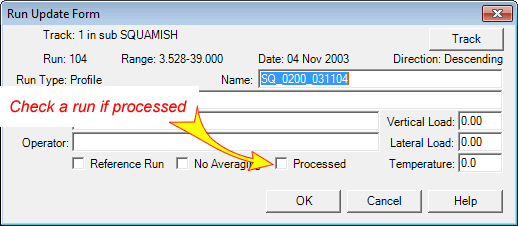
Run Update Form
In the Run Explorer run will change color according new processed status.