 button or Calculate from the Profile menu of one of the Profile View windows. Alternatively consider the Rail Type Editor tool that can be accessed by clicking on an individual rail type point within the Rail Type strip chart.
There are three common reasons for re-calculating the measurements and classification of profiles that have already been read into the database:
To correct the rail type identification, if the existing rail type is incorrect.
When condemning limits or other classification criteria change (see Classification Options).
When modeling options affecting rail measurement change; in particular, the Gauge Point Options and the Gauge Face Options (see Modeling Options).
To recalculate measurements for an individual profile, use the button or Calculate from the Profile menu of one of the Profile View windows. Alternatively consider the Rail Type Editor tool that can be accessed by clicking on an individual rail type point within the Rail Type strip chart.
To recalculate measurements for a group of profiles selected from a wear chart, mark the plotted points with the mouse.
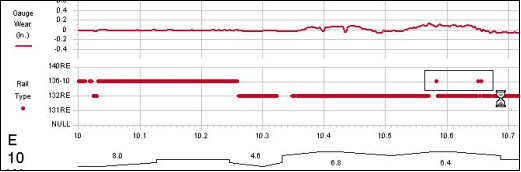
Using the mouse to mark profiles to be re-calculated
Click on the button to specify the new rail type. The selected profiles will be recalculated and the charts immediately redrawn. The rail type of individual rail profiles can be modified by clicking the rail profile in the Rail Type section of the Wear Chart and selecting the preferred rail type from the drop-down menu that appears.
To recalculate all profiles in an entire run or a mileage range, choose Run\Profile\Calculate Measurements from the Two-Up Profile View menu.
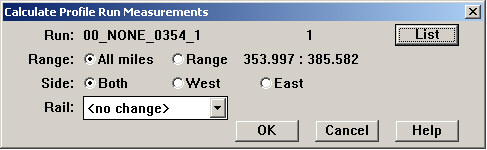
The Calculate Profile Run Measurements Dialog
Select a run using the List button. Re-calculation can be restricted by mileage range and by side. If Rail is set to "<no change>", profile measurements are recalculated for the rail type they are currently identified as. If it is set to "<from reference run>", and there are reference runs in the database for the same territory and track, rail type will be taken from the reference runs. See Rail Section Identification Using Reference Runs for detailed instructions. If a specific rail type is selected, all included profiles will be re-labeled as the selected type and their measurements recalculated accordingly.
Alternatively, to recalculate measurements and classification for several runs at once, refer to section Calculate All - Batch Operations .